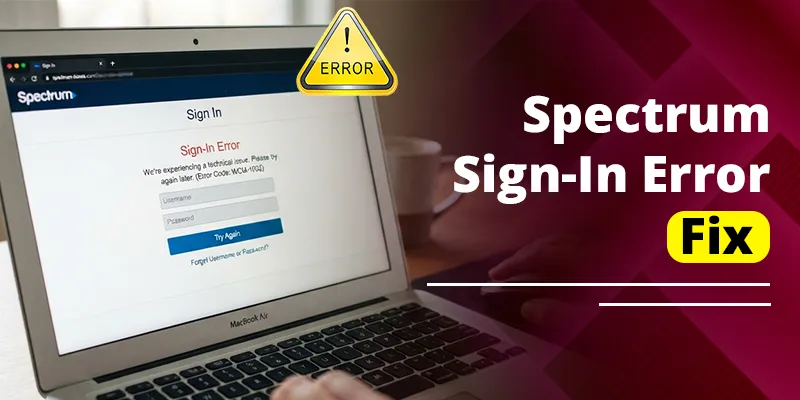
Most Spectrum TV App sign-in errors come down to one of four things: a wrong or incomplete username, automatic sign-in failing on your home Wi-Fi, a forced password reset from Spectrum’s security system, or a temporary outage on Spectrum’s side. Start by signing in manually with your full Spectrum username and password while connected to your home Spectrum Wi-Fi. That one step clears Unable to Sign In (WLI-1010) and Auto-Access Denied (WLI-1027) for a lot of people.
If it doesn’t, this guide walks you through every common sign-in error code, the fix that matches it, device-specific steps for Roku, Apple TV, Samsung, Fire TV, and phones, and how to reset your Spectrum password the right way so the app accepts it.
Quick Overview
| What you see | What it usually means | First fix to try |
| WLI-1010 / ILI-1010: Unable to Sign In | Username or password not accepted | Re-enter your full username and case-sensitive password, or reset it |
| WLI-1027: Auto-Access Denied | Automatic sign-in on your home network failed | Choose Sign In and enter your credentials manually |
| Prompt to change your password | Security flag, often from too many out-of-home streams | Reset the password, then sign in again on each device |
| “Exceeded the maximum number of attempts” | Temporary lockout after failed tries | Stop trying, wait, then use Forgot Username or Password |
| ILI-9000, ILP-999, RLP-999, RLI-9000 | Request couldn’t finish, often server-side or network | Wait a few minutes, check for outages, restart the app |
| Sign-in loop or asked to sign in every time | Not on Spectrum Internet, VPN, or app cache issue | Connect to home Spectrum Wi-Fi, turn off VPN, clear cache or reinstall |
Why Won’t the Spectrum TV App Let Me Sign In?
The Spectrum TV App checks two things every time you sign in: who you are (your username and password) and where you are (whether you’re on your home Spectrum Internet connection). If either check fails, you get an error or a sign-in screen that won’t go away.
Here are the most common causes, roughly in order of how often they show up:
- Incomplete username. Some older usernames include a domain, such as @charter.net. Spectrum’s Roku help page says to enter your complete username, domain included.
- Password case mismatch. Passwords are case-sensitive. On a TV keyboard, it’s easy to miss the shift or symbols tab.
- Auto-fill or saved credentials are stale. If you changed your password on Spectrum.net, your TV or phone may still be trying the old one.
- A brand-new username. New usernames need time to activate before they work in TV apps.
- Security flag. Spectrum may force a password change if it sees unusual sign-in activity, such as too many streams away from home.
- You’re not on Spectrum Internet. On TVs and streaming devices, the app may not stay signed in, or may not authenticate at all, on another provider’s network, a VPN, a hotspot, or guest Wi-Fi.
- Spectrum-side outage. Sometimes nothing is wrong on your end. On August 3, 2026, thousands of Spectrum TV App users across several states reported failures at once, and the app was back to normal by about 10 p.m. EDT that night.
What Do Spectrum TV App Sign-In Error Codes Mean?
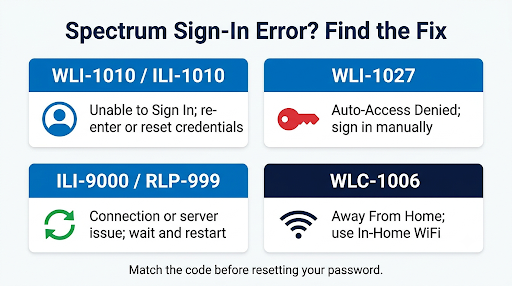
Each code tells you what failed, so match the code before you start resetting things. The first letter of the code often changes by device. You might see WLI on a web browser, ILI on an iPhone or iPad, and RLI or RLP on Roku, but the fix is usually the same.
| Error code | Message | Fix |
| WLI-1010 / ILI-1010 | Unable to Sign In | Confirm your username and password. If they still fail, use Forgot Username or Password. |
| WLI-1027 | Auto-Access Denied | Sign in manually with your Spectrum username and password. |
| ILI-9000 / ILP-999 | Unable to Complete Request | Wait a few minutes, restart the app, and try again. |
| RLP-999 / RLI-9000 (Roku) | Request or authentication failed | Restart the Roku, check for outages, reinstall the channel if it repeats. |
| WLC-1006 | We See You’re Away From Home | Connect to your in-home Wi-Fi, then restart the app. |
| JLI-9000 (Apple TV Provider) | TV Provider sign-in failed | Sign in inside the Spectrum TV App directly instead of through Apple’s TV Provider setting. |
| HTTP Status 500 | Unable to do Single Sign On or Federation | Usually a server-side problem with network apps like ESPN. Wait and retry later. |
If your code points to a connection or server problem rather than your credentials, our guide on fixing Spectrum’s Unable to Complete Request and Service Unavailable errors goes deeper on the 9000 and 999 codes.
How Do You Fix “Unable to Sign In” (WLI-1010) on the Spectrum TV App?
Re-enter your credentials by hand, using the full username and exact password capitalization. If that fails, reset the password and sign in with the new one.
- Confirm the username works elsewhere. Sign in at Spectrum.net or in the My Spectrum app on your phone. If it fails there too, the problem is your account credentials, not the TV app.
- Type the username manually. Don’t rely on auto-fill. Include any domain your username was created with.
- Check capitalization and symbols. On TV keyboards, use the tabs above the on-screen keyboard to switch case and find symbols.
- Close and reopen the app. This clears a stuck sign-in session.
- Reset your password if the username works but the password is rejected (steps below).
Common mistake: Using your email address instead of your Spectrum username. Your contact email and your Spectrum username are not always the same thing. If you’re unsure, use “Forgot Username” to look it up.
What Does “Auto-Access Denied” (WLI-1027) Mean and How Do You Fix It?
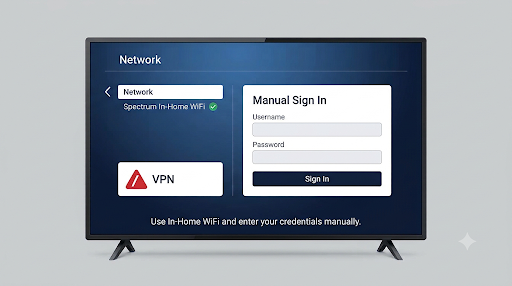
Auto-Access Denied means the Spectrum TV App tried to sign you in automatically and couldn’t. The fix Spectrum gives is simple: sign in manually with your Spectrum username and password.
When you’re home on Spectrum Internet, the app can recognize your connection and let you in without typing anything. When that recognition fails, you get WLI-1027. That can happen when:
- Your router or modem was recently replaced or reset
- You’re on a VPN, mesh extender with its own network, or guest network
- Your account was just changed, such as a new TV package or a moved service address
- Spectrum’s authentication servers are having a hiccup
To fix it:
- On the error screen or the app’s home screen, choose Sign In.
- Enter your full Spectrum username and password manually.
- If it still won’t let you in, turn off any VPN and connect directly to your main home Wi-Fi network.
- Power the device all the way off, wait about a minute, and try again.
Watch for the “Spectrum Customer” trap. Some Samsung TV owners report that after signing out, the app logs them back in as a generic “Spectrum Customer” with no TV package. If that happens, sign out, close the app fully, then pick Sign In and enter your own username before the app auto-connects.
How Do You Reset Your Spectrum Password for the TV App?
Reset it on Spectrum.net or in the My Spectrum app, then sign in again on every device that streams. The TV app uses the same Spectrum username and password as your main account, so there’s no separate “TV app password.”
Reset on Spectrum.net (forgot password)
- Go to the Spectrum sign-in page on a phone or computer.
- Select Forgot Username or Password? under the Sign In button.
- Choose to verify with your email address, phone number, or account information.
- Enter the code Spectrum sends you.
- Create a new password, confirm it, and save.
Change it in the My Spectrum app (you know your current password)
- Open the My Spectrum app.
- Tap More at the bottom of the screen.
- Choose Settings, then Sign in & Security.
- Update your password and save.
After any password change, sign out and back in on every TV, streaming stick, and phone that uses the Spectrum TV App. Devices holding the old password are one of the biggest reasons people think the reset “didn’t work.”
Tip: Do the reset on a phone or computer, not the TV. Typing verification codes and new passwords with a remote is slow and error-prone.
Why Does Spectrum Keep Asking Me to Change My Password?
The usual reason is streaming outside the home. According to a Spectrum employee on the Spectrum Community forums, each login is limited to two streams at once when you’re away from your home network, while streaming on your home network is unlimited. If more devices try to stream away from home on the same login, Spectrum may flag it and ask for a password change. Spectrum says this is a security feature that can’t be turned off.
The fix Spectrum recommends is to give each person their own login:
- Sign in to your Spectrum account.
- Go to More, then Settings, then People.
- Add a profile with its own username and password for each family member who streams away from home.
Separate logins spread out the out-of-home streams, so you get fewer forced resets. If you’re also hitting a stream cap, see our guide on the Spectrum TV App maximum video streams error.
Some Roku users have also reported that Spectrum support fixed a stubborn sign-in failure by having them create a completely new password, even though the old one still worked on Spectrum.net. If your password works on the website but not on the TV, a fresh password is worth trying.
What If It Says You’ve Exceeded the Maximum Number of Sign-In Attempts?
Stop trying right away. Repeated attempts during a lockout can keep you locked out longer. Wait a while, then reset your password with Forgot Username or Password instead of guessing again.
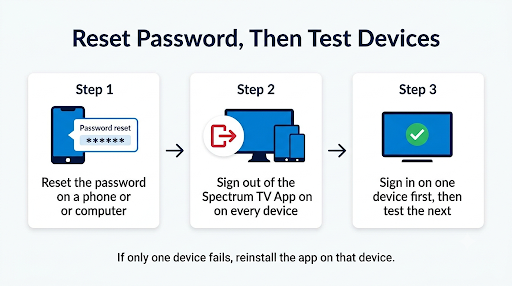
This message often shows up after a TV or streaming stick quietly keeps retrying an old saved password in the background. So after you reset:
- Sign out of the Spectrum TV App on every device first
- Sign back in on one device, confirm it works, then move to the next
- If the lockout keeps returning, contact Spectrum support so they can check the account
Why Does the Spectrum TV App Ask Me to Sign In Every Time?
If you’re not using Spectrum Internet, this is expected. A Roku community moderator confirmed that without Spectrum Internet, the app requires you to sign in each time as a security measure. On Apple TV, community answers also point out that the app may not authenticate properly through other internet providers.
If you do have Spectrum Internet and still get a sign-in loop:
- Turn off VPNs on the device and the router.
- Use your main network, not a guest network or a separate extender network.
- Restart your modem and router. Unplug them for about 60 seconds, then plug them back in.
- Clear the app cache or reinstall the Spectrum TV App (device steps below).
- Update the app and your device software. Older versions can drop saved sessions.
If the app is telling you you’re away from home when you’re sitting on your couch, that’s a location issue rather than a password issue. Our walkthrough on the “We See You’re Away From Home” message covers that in detail.
How Do You Fix Spectrum TV App Sign-In Errors on Each Device?
The core fixes are the same everywhere, but the menus differ. Use the steps for your device.
Roku and Roku TV
- Press Home to exit the Spectrum TV channel, then reopen it.
- Unplug the Roku from power for at least 30 seconds, then plug it back in.
- If sign-in still fails, remove the Spectrum TV channel and add it again from the Roku Channel Store.
- Sign in with your full username, matching every capital letter.
Roku errors like RLP-999 and RLI-9000 are Spectrum app errors, not Roku errors, so Spectrum support is the right place to go if they don’t clear.
Apple TV, iPhone, and iPad
- Force-quit the Spectrum TV App and reopen it.
- Update tvOS or iOS to the latest version.
- Delete and reinstall the app if the sign-in screen keeps returning.
- If you see JLI-9000 through Apple’s TV Provider feature, try signing in directly inside the Spectrum TV App instead. One iPad user reported that declining the TV Provider option and signing in manually worked.
Samsung, LG, and other smart TVs
- Close the app completely, then turn the TV off at the power outlet for a minute.
- Check for a TV software update in the TV’s settings menu. On Samsung, look under Settings, then Support, then Software Update.
- Uninstall and reinstall the Spectrum TV App to clear stored data.
- Sign in manually. Watch for the generic “Spectrum Customer” auto-login described above.
Amazon Fire TV and Android TV
- Go to Settings > Applications > Manage Installed Applications > Spectrum TV on Fire TV, or Settings > Apps > Spectrum TV on Android TV.
- Select Force Stop, then Clear Cache.
- If that doesn’t help, select Clear Data. This signs you out, so have your username and password ready.
- Reopen the app and sign in again.
Android phones and tablets
- Open Settings > Apps > Spectrum TV > Storage.
- Tap Clear Cache, then try signing in.
- If it still fails, uninstall and reinstall the app from the Google Play Store.
Web browser (SpectrumTV.net)
- Clear your browser cache and cookies, then try again.
- Try a private or incognito window to rule out a bad saved password or extension.
- Turn off any VPN browser extension.
Is Spectrum Down, or Is It Just Me?
If your username and password work on Spectrum.net but every device fails in the TV app at the same time, it’s probably an outage. Check before you reset anything, so you don’t change a password that was never the problem.
- Open the My Spectrum app or Spectrum’s support site and check for outages at your address.
- Look at a third-party tracker like Downdetector to see if other people are reporting problems right now.
- If there’s an outage, wait for it to clear. Errors like RLP-999, ILP-999, and ILI-9000 often go away on their own.
If the app connects but streams keep failing after you sign in, the issue has shifted from sign-in to connectivity. Our guide to Spectrum TV App connection errors picks up from there.
What Should You Do If You Just Created a Spectrum Username?
Give it time before you troubleshoot. Spectrum’s current help says a new username can take up to 60 minutes to work with the Spectrum TV App. Older Spectrum support pages told new users to wait 24 to 72 hours before signing in to TV apps. If it’s been more than an hour, wait a full day before calling support.
The same delay can apply after a package change. Channels or network apps you just added may not authorize right away.
Why Won’t My Spectrum Login Work in Other TV Apps Like ESPN or Discovery?
Network apps such as ESPN, HGTV, or Discovery use your Spectrum login through a separate TV Everywhere sign-on system. That system can fail even when the Spectrum TV App itself works fine. An HTTP Status 500 “Unable to do Single Sign On or Federation” message is a common sign of this.
- Confirm the channel is part of your current Spectrum TV package.
- Sign out of the network app, then sign in again and choose Spectrum as your provider.
- If many network apps fail at once, it’s likely a temporary Spectrum authentication problem. Try again later.
- If you’ve recently canceled Spectrum TV, your Spectrum credentials no longer work in these apps.
When Should You Contact Spectrum Support?
Contact Spectrum if your credentials work on Spectrum.net but not in the TV app after a password reset, a reinstall, and a router restart. At that point, the issue is likely on the account side, and only Spectrum can refresh it.
When you reach out, have this ready:
- The exact error code and message
- The device and model (for example, Roku Express or Samsung smart TV)
- Whether other devices in your home can sign in
- What you’ve already tried
Ask the agent to refresh your account authorization for the Spectrum TV App. Spectrum offers 24/7 chat through its support site, and the Spectrum Community forums are monitored by Spectrum employees.
Frequently Asked Questions
Is the Spectrum TV App password the same as my Spectrum.net password?
Yes. The Spectrum TV App uses your main Spectrum username and password. If you change your password on Spectrum.net or in the My Spectrum app, the new one applies to the TV app too, so you’ll need to sign in again on each device.
Can I sign in to the Spectrum TV App without Spectrum Internet?
You can sign in on some devices, but you may have to enter your credentials every time, and some live channels and features are limited outside your home network. For the smoothest experience on a TV, use the app on your home Spectrum Internet connection.
Why does the Spectrum TV App work on my phone but not my Roku?
Your phone may be using a saved session or a different network, while the Roku is trying an old password or failed a location check. Sign out on the Roku, restart it, and sign in manually. If only one Roku in the house fails, reinstalling the channel on that device often fixes it.
How do I find my Spectrum username if I forgot it?
Go to the Spectrum sign-in page and choose Forgot Username or Password. You can verify with the email address or phone number on your account, and Spectrum will show your username so you can sign in or reset your password.
Will clearing data or reinstalling the Spectrum TV App delete anything?
It signs you out and resets app settings on that device, but it doesn’t touch your Spectrum account, your TV package, or recordings stored in a cloud DVR. Just make sure you know your username and password before you clear data.
Does changing my password sign out other people in my household?
Yes, anyone using the same login will need the new password. That’s why Spectrum suggests adding separate profiles under Settings, then People, so one family member’s reset doesn’t lock everyone out.
Final Recommendation
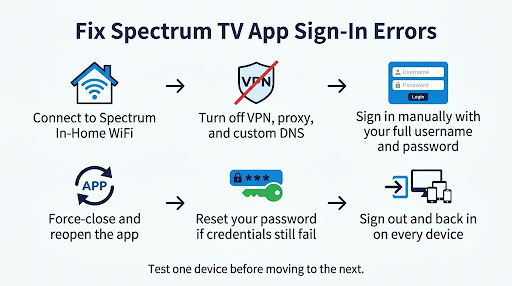
Start with the simplest fix: connect to your home Spectrum Wi-Fi, turn off any VPN, and sign in manually with your full username and exact password. If the app still refuses, reset your password on a phone or computer, then sign in again on every device one at a time.
If every device fails at once, check for an outage before changing anything. And if you keep getting forced password resets, set up separate logins for everyone who streams away from home. That single change prevents most repeat sign-in problems.